Choose one syllable count or combine several, then set the quantity and vocabulary difficulty.
 LAST BELL STUDIO
03 / PHONICS
SYLLABLE
SPLIT
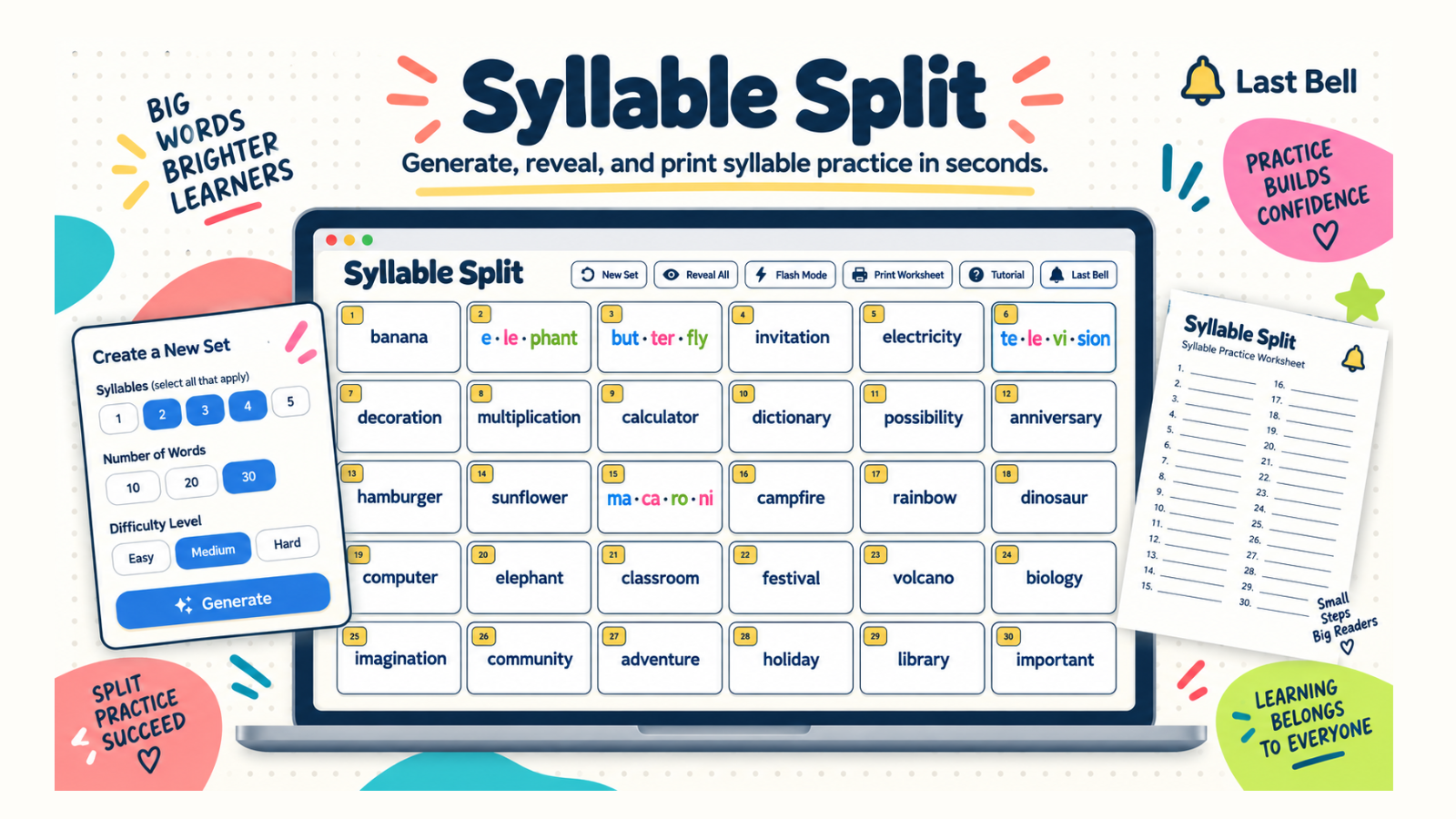
Generate, reveal, and print targeted syllable practice in seconds.
1–5 SYLLABLESCURATED WORD BANKFLASH MODEPRINT WORKSHEETTUTORIAL MODE
WHAT IT DOES
ONE SET. THREE WAYS TO PRACTICE.
Students see whole words first. Reveal individual cards or the full board when you are ready to check.
Use the exact generated set in Flash Mode or print it as a student worksheet with an optional teacher answer key.
THREE STEPS
HOW IT WORKS.
Select 1–5 syllables, choose the number of words, and pick Easy, Standard, or Challenge vocabulary.
Generate the board, then click words to reveal their syllable splits as the class works through them.
Run the set one word at a time in Flash Mode or print a matching worksheet for independent practice.
TEACHER FIELD NOTES
Give learners a chance to try before you reveal.
Syllable Split helps learners approach words in manageable parts. Select one or more syllable counts from one to five, choose a quantity and pick Easy, Standard or Challenge vocabulary. The board presents whole words first; you decide when to reveal individual divisions or the full set.
Plan a ten-to-fifteen-minute practice cycle
Choose words that fit learners who already have some experience reading English. Primary learners may need a small set of familiar items; older learners can work with longer or less familiar words. Syllable count and vocabulary familiarity are different demands, so change one at a time when possible.
Ask students to say a word, mark where they think its parts belong and compare with a partner. Reveal the displayed split and discuss it. Then use Flash Mode to revisit the same words one at a time, or print the matching worksheet for independent practice.
Reuse the exact set next lesson
After generating a useful board, choose Export set and keep the downloaded JSON file. Later, choose Import set and select that file to restore the saved words and their order. This is useful for revisiting difficult material, sharing a prepared set with a colleague or moving your practice set to another device.
Use files created by Syllable Split rather than renaming an unrelated document to JSON. The importer checks the format and word data before replacing the current set. Cancelling a selection or submitting an invalid file leaves the existing board in place. The files stay on your device unless you choose to share them.
Is the exported file the student worksheet?
No. Export set saves reusable practice data; worksheet printing creates the classroom handout. Preview the print layout and optional teacher answer key separately. Keep the JSON file if you want to return to the same board later.
Should learners memorise every division?
Use the displayed parts as a teaching aid, alongside listening and saying the whole word. Do not turn the activity into a speed test or assume one correct response demonstrates fluent reading. Tutorial Mode introduces generation, reveals, Flash Mode and printing so you can choose the right sequence for your lesson.
Try it in a phonics lesson
See how I use Classroom Timer, Syllable Split and Phonics Bomb in my phonics classroom routine, from opening dictation to the final standing game.
TUTORIAL
SEE IT IN ACTION.
BUILT-IN TUTORIAL MODE
LEARN THE WORKFLOW INSIDE THE APP.
The guided seven-step tutorial walks through syllable selection, quantity, difficulty, Generate, click-to-reveal cards, Flash Mode, and worksheet printing.
KEEP BROWSING